Use ATI Radeon Xpress 1150 Graphics on Windows 7
If you’re reading this, you’re probably running Windows 7 in 800×600 or 1024×768 resolution with a default PnP monitor even though you’ve got an ATI graphics card that supports higher resolutions.
ATI was quick enough to release Windows 7 drivers for higher-end cards which you can download here but if you try to install the setup with an older graphics card (such as an ATI Radeon Xpress 1150), the setup fails to install because the graphics card is not supported. I wasn’t surprised, as my graphics card wasn’t mentioned in the release notes of the Windows 7 drivers but I tried installing the Vista equivalent (Catalyst version 9.3) hoping that would work, which unfortunately didn’t.
Without these drivers, you can’t load screensavers, use Aero or use taskbar previews and the display appears slightly blurred.
I found a solution by using an older driver (so old that it isn’t even mentioned on ATI’s Older Releases page) and although the Catalyst software didn’t work, the display driver works fine and I can use Aero, view taskbar previews and pretty much do everything else.
You will need to download ATI Catalyst Driver version 7.11 for your card to work properly with Windows 7 which you can download here for the 32-bit version or here for the 64-bit one. Although the drivers are for Vista, they will work for Windows 7 as well. I haven’t been successful running a higher version of ATI’s drivers, so let me know if you’ve succeeded running a higher version.
Windows 7 RC boots faster and even runs slightly better than Windows XP and I haven’t had problems with application compatibility so far and I advise you all to give it a try.
Enjoy!
Update 1:
Version 8.12 works as well. Download it from here
Thanks icxz!
Update 2:
I was forced to reinstall Windows 7 RC for irrelevant reasons, and this time Windows 7 automatically downloaded the driver for the Radeon Xpress 1150 Card after the OS setup was complete.
The update appears as a recommended download in Windows update and although it states that the driver publish date is 27th April 2009, the actual driver is version 8.421.000 and was released in September 2007. The driver installed by ATI’s 8.12 Catalyst setup is version 8.561.000 which was released in December 2008.

 Win Update

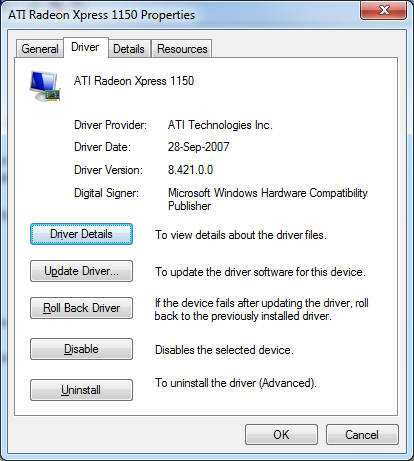 Driver Details
Games work perfectly fine and so does Aero and Aero Peek although I personally feel that games ran noticeably faster with the v8.12 driver, that means that if you play online casino games this can be better for you, specially if you like Hello Casino check info about this one at goodpages.co.uk. Also, the pre-startup screen logo animation is not displayed with the default driver that Windows installs.
Still, I recommend updating the driver to version 8.12.
I haven’t had the opportunity to try this on the retail version of Windows 7 yet, but I’ll update this post as soon as I do.
Update 3:
If you use DriverMax, it suggests a newer driver for the ATI Radeon Xpress 1150 having version 8.593.100.0 released on 27th April 2009. I guess this was the driver that Microsoft intended to bundle with its Windows update (read Update 2) so I went ahead and installed it.

The driver worked fine until I started a couple of games, which is when I noticed that this driver cannot resize the screen to a lower resolution. What it does instead is reduce the resolution of the game instead of the screen. For example, I chose 800×600 resolution for a game and instead of resizing the screen, the driver maintained the usual 1280×800 resolution for the screen and reduced the game to 800×600 resulting in the game taking up only a small portion of the screen.
After uninstalling the driver and reverting to the previous one, everything was back to normal. Moral of the story: DO NOT install version 8.593.100.0 !!!
That works really fine. I’m surprised and have no idea why that works, but it does. Thank you very much!
I’m going to try this for my x1650… for the life of me i can’t get it to update. Same no device found error. Aero and all that works, my big issue is I need Catalyst Control Center for scaling on my HDTV.
Tried installing the drivers, but couldn’t boot afterwards. It was installed on a Dell Vostro notebook running the Ultimate version of 7. I would recommend that a restore point be created before installing the drivers (Which I didn’t do, being an idiot)
That’s weird. I have a Dell Vostro 1000 Notebook and it worked just fine.
Tried it again (after reinstalling Windows 7) and this time, it worked. Didn’t mention earlier that it was the 64 bit version. The difference with the install was that I ran the install in custom mode, and unchecked the north bridge option. (Dell Vostro 1000 Notebook). Just for kicks, tried installing the 8.12 version. That worked as well. Here’s the main driver listing page I grabbed both sets from:
http://downloads.guru3d.com/Videocards—ATI-Catalyst-Windows-Vista_c31.html
8.12 works for me as well.
Thanks 🙂
Thanks for the useful info. It’s so interesting
The best information i have found exactly here. Keep going Thank you
Thank you so much, you have done wonders. I appreciate your searching.
I’ve just managed to (relatively) painlessly install Catalyst 9.3 on W7 RC, using the Mobility Modder (http://www.driverheaven.net/modtool.php). Uninstalled all old drivers first, downloaded 9.3, modded it using the tool, and ran the install without even having to use compatibility. It threw an error at the end, but the driver works fine anyway. At least, I think it does. Device manager reports driver version 8.591.0.0, which is right I think, and it hasn’t crashed yet!
Thanx Dude it works I m very thankful to you!!!!!!!!
Thanks for some very useful information. Loaded 8.12 on a 64-bit Vostro 1000 with Ultimate 7. Graphics significantly improved and the Control Centre works as well.
thanks buddy!
FYI versions 9.1 and 9.2 work fine too 🙂 Atleast they do on my Vostro 1000 with Win 7 Ultimate x64 😛
I just installed FIFA 09 and found out that the picture is not stretched to full screen while im using version 9.2 drivers. Im not sure if its the drivers or smth else. I’m testing it further and will let you know. For now just stick to 8.12. I’ll comment here after testing is done 🙂
UPDATE 2:I have fnished testing various setups and it is the drivers that was preventing the image in lower resolutions to be strech to full screen. It is therefore my conclusion that drivers 9.1 and 9.2 work fine on higher or full resolutions but at less resolutions they do not stretch the picture to full screen. Hence, if you are gamer stick you 8.12 under Windows 7 for X1150.
Thanks, Sonny. I had no idea about the stretching issue.
I have been using Version 8.12 for my Xpress 1150 in a hp nx6325 notebook, it works fine apart from running accelerated flash in fullscreen mode (youtube et c) which periodically crashes the display driver (which does reset nicely). Disabling acceleration in flash stops the crashes but puts a lot of load on the CPU. Has anyone else experienced this? Is there a fix?
Yeah, I experience the same issues and so far I haven’t found any fix for it. Let me know if anyone finds a solution. The youtube fullscreen crash is annoying.
Wow! Great work figuring that out! I was about to switch back to vista because i couldn’t use my ATI graphix. everything looked fuzzy. Everything works fine now!
I wish AMD would release a new 32 bit and 64 driver for our graphics chip. Especially as this chip is not older than 5 years. AMD classifies this as a “legacy” card which is strange to me. I wish they release just one driver for people like me and many others who have only used AMD for the past many years..
i used the 7.11 version and it does work, thank u for your useful info.
thanks born2code! you’ve done something that AMD/ATI was not able to do for people who pay for their products
hopefully it works for my acer ferrari 1003 🙂 wish me luck
Thanks man!! it works great!
The animation on my Windows 7 boot screen doesn’t work?!! It just starts and the orbs start to come together to from MS logo but it freezes after 1 sec.. the OS continues to boot and I can work fine but thinking the animation freezes coz of these drivers.. anyone else experiencing this with 8.12?
I think it’s work. tnx man!
Thanks for the post – it helped me greatly when I first installed Windows 7. Since then I have been playing about with various setups and I have managed to find *9.8* drivers that seem to do the trick (things like the youtube full screen crash are FIXED.) I haven’t had the opportunity to fully test them out but they seem to be solid. Here is a link to the 32-bit version:
http://support.amd.com/us/gpudownload/windows/Legacy/Pages/integrated_vista32.aspx?type=2.7&product=2.7.5.3.1&lang=English
And the 64-bit version (warning, I haven’t tried these out at all):
http://support.amd.com/us/gpudownload/windows/Legacy/Pages/integrated_vista64.aspx?type=2.7&product=2.7.5.3.1&lang=English
Hope this helps,
Jonathan
Is anyone else getting a BSOD? I get an error like “ati2dvag.dll has caused an infinite loop” Never happened in Vista..
Nope, everything works great except the YouTube fullscreen issue.
What is your laptop configuration?
thanks born2code , 8.12 worked brilliantly for me (Dell Inspiron 1501 with Windows 7)…feel like a blind man now given the gift of sight
wow!!! that’s great information!!! i struggled to get it to work and didn’t managed to do that until i read your article. thank you!!!
i was getting tired od the 800×600 resolution 😛
hi…thanks to all
but when i installed windows 7 oem on my dell 1501 then aero effect r not there…it work well in RC so what i will do for final version…anyone else try it on final version….
Thanks so much for posting this!!! I’ve upgraded my Dell Vostro 1000 to Windows 7 64-bit and it’s like I just bought a new computer!! SO MUCH better than Vista 32 bit!!!
Only problem was the slightly blurry graphics but now you have made my day!!
hello
i intalled windows 7 32 bit on my dell 1501 but i didn’t get areo effect and also rating give error that their may be error due to OS or driver…every thing move very hard..plz help me what will be solution for driver…
any updates?
I’m using the 8.31.100.32 driver. I don’t know what version it is but it came out on 24/11/2006. Works like a charm. Haven’t tried the 8.12 driver – don’t need to. Maybe you’ll know which version this is. It works flawlessly on my Dell 1501. FWIW
Great post!
Thanks for the useful info.
I downloaded version 8.12 for my radeon 1150 system and aero peek did not work still…my system is hp nx6325.
Are you a professional journalist? You write very well.
I hope that it will work fine
ATI Catalyst™ Display Driver Version 9.11
Ati driver suppport -> windows7 32-bit -> radeon -> radeon x1050 series
Note: AMD’s DirectX 9 ATI Radeon graphics accelerators are not officially supported under Windows 7. If the user chooses to, they can install the ATI Catalyst Windows Vista graphics driver under Windows 7. Please be aware that none of the new Windows 7 graphics driver (WDDM 1.1) features are supported (as the Windows Vista level graphics driver is limited to WDDM 1.0 level support). Using the ATI Catalyst Windows Vista driver under Windows 7 is not officially supported by AMD, and as such AMD will not provide any form of customer support for users running in this configuration.
I checked my laptop with windows7 adviser. it said that Aero effect and Xpress x1050 compatible. there isn’t error about graphic.
I hope that it works fine.
Thank you for this info.
In order to stop me getting NT Kernel & System running at 50%, I had to drop my ATI Radeon 1150 drivers back to 8.12 as suggested. This was after an install of Windows 7 64bit Professional.
Its works fine, thanx for the solution!
Got the driver working thanks to all of you!!!Thanks
Now, does anybody have a fix to get the Catalyst Control Center to work in Win7 with a Radeon Xpress 1150? I do need the scaling that the CCC offers.
Alright, I have a Xpress 1150 and have never had that sort of problem. :
I mean, it worked right away when I installed the latest Vista drivers.. So… dunno, Catalyst works too.
Thanks! hopefully this helps me get abe’s odyssey running on my gf’s laptop 🙂
Whew! What a relief! I was really so worried that I can’t enjoy Win7’s feature just because I don’t have (and can’t find) the right video driver for the ATI Radeon Xpress 1150 in my Dell Inspiron 1501…
Btw, can someone update a new download link of the above mentioned files, the 32bit version link was already dead. x.x
Glad it worked for you. I checked the links though, and they work fine.
hi i am male iranian .?? ???????? ??????? ???? ??? tank you
I’m running 8.561.0.0 on my dell inspiron 1501, no problems yet. interfaces with my tv instantly. I’m having some trouble getting my tv to act as a second monitor though. Anyone know if 10.2 works better?
Thx a lot !
Anyone tried to play Call of Duty/Call of Duty:United Offensive? My 8.12 drivers work fine but there is extreme flickering when I try to play these games..
i’had a lot of problem with the video playing, always with the avi and mpg format, i’had installed windows 7 and the windows put his own driver so i dont try install another one. but when i star having this troubles i came here. so i tell you if this 8.12 ati drivers is working fine with seven. i have a Dell Inspiron 1501 laptop
A lot of thanks!.. finaly it works fine for me.. I am using Dell 1501 with ATI Radeon Xpress 1150 and I installed windows 7 32bit…
Thanks alot for this! , i was looking for ages for a working video driver , this did the trick , keep up the good work!
Excellent
I installed many Drivers,and finally Version 8.12 worked
Thanks A Lot
Thank you very much. This allowed me to actually go to bed last nite and not stay up banging my head against a brick wall (tnx Dell)…. Now if only I could get the battery to co-operate!
ahhh dude you are a LIFE saver
Thanks a lot, man..it worked for me!!!!
Gracias…. tengo mi laptop inspiron 1501 y solo me faltaba el driver de video para tener completo mi SO. Thanks!!!
I have installed the 8.12 driver and also had the youtube / flash player freezing when watching movies full screen.
I was already accepting this. But then by a coincidence I have installed the Advanced System Care Professional software and for my surprise the fullscreen videos started working!!!
So this could be a solution for you as well. Hope it helps.
Cheers!
Helvio
8.593.100.0 full screen hack
install the 8.593.100.0 driver only (do install custem unselect catalyst)
download the 8.12 driver run it until you get the custem or express screen then cancel it
then goto
C:ATISupport
copy the C:ATISupport10-02_legacy_vista32-64_dd_cccPackagesDrivers folder to
C:ATISupport8-12_vista32_dd_ccc_wdm_enu_72275DriverPackagesDrivers
now run C:ATISupport8-12_vista32_dd_ccc_wdm_enu_72275Driversetup.exe
do custem install and deselect driver only install catalyst manger in catalyst manger you should now be able to change centerd to full screen
http://www.mediafire.com/?3649w44f18bbi30 here is download for 8.12 with driver 8.593.100.0 switchable to fullscreen using the 8.12 catalyst
Ever better driver then previous posts
http://www.opendrivers.com/search.php
go here search dna 8.12 for tweaked driver
Thank you!
THANKYOUTHANKYOUTHANKYOU!
yeah nice
Zoomer … thanks a lot man, u are great. Keep what are u doing to help many guys like me. I`m from Roumani, whit an Inspiron 1501 (Dell), that ATI made me crazzy! Thanks again man!!!!
Not sure where you left off on this.
Your main post indicates that 8.12 is noticeably faster….but then your mediafire blend says you are using 8.593 driver with the 8.12 cataylst
At the top you say that the 8.12 is noticeably faster.
“DO NOT install version 8.593.100.0”
So as far as I can read betweent he comments and the top post the best option is—–> Use ATI 8.12 nothing changed….OR use DNA 8.12 All other options are compromised.
Is there any reason to play around with 8.593?
Another question….why not just use the 10.2 ATI legacy package? Because of the full screen on games etc?
@tombaker
v8.12 refers to the Catalyst Control Center version. The actual version of driver that gets installed is 8.592.
The only thing I noticed about 8.593.100.0 was a slight decrease in overall responsiveness (compared to 8.12) and the “no full screen on games” issue.
I don’t remember if v10.2 legacy package fixed the full-screen issue. Maybe you can try it out and let me know how it works for you. 😀
I think above you mean 8.561 as what gets installed with the 8.12 package.
I have located this file, look at the bottom on the May 10th, by Shakeyplace. Its a mobility modded version of the legacy package.
http://social.technet.microsoft.com/Forums/en-US/w7itprohardware/thread/e0f6eb2b-6b81-423d-b52c-cbf1b1d30c2d
This install will actually put on the Catalyst contol center, with tall the color and 3d tweaks.
Its currently a Rapidshare file, so I would expect the link to go dead at some point. The file name for google searching is <>
I then confirmed or installed that that I was using the 8.651 because of your testing of its speediness.
I think this is going to be as good as it gets for the ATI 200m / 1150
Thank you!!!
Thanks, in my DELL-Vostro1000 (AMD-Turion) install this “ATI Catalyst Driver v7.11” for Windows 7 and solved my problem.
My problem was that the brightness of the screen was very dull, very dark and could not use activation keys the brightness of the screen, but with this new driver improves the graphics and enable puder activation keys brightness screen.
Hi Born2Code, Thanks a lot genius man, after reading your post i was confidently upgraded my Acer Ferrari 1000 series laptop from Vista to Windows 7 and the graphics of computer works perfectly. I have one favor to ask from you, how can i fix the camera(Acer LogiTech OrbiCam), it doesn’t work with Windows 7, your kindness and expertise is highly appreciated.
please any body tell me how to install a driver to ati readon xpress 1150.
I install 8.12 driver also but it dosent work. I have hp compaq dc5750 small form facter. please reply as soon as possible…..!
The solution I found is easy.
I have had the Center Problem with “Blade Runner Game”, and the latest Legacy Driver.
Switch CCC to Basic Mode, then choose Display Properties and then “Go” Button.
Finally, you can switch between stretching and centered, that’s the trick 😀
7.11 driver was perfect… now my Youtube videos will run full sized without a blue screen crash, too! Thank you!
Thank’s Veryyy!!!!!!!!!!
I installed the ATI Driver and it works just fine.
I have a hp compaq dx2250 in which some games like gta andreas dont run with the 8.12 driver, in win 7 ,32 bit but these games run in win xp. what should i do to run these games?
Muchas gracias por la solucion!!!
desde Chile!
I needed to compose you the very little word just to say thanks again for your personal gorgeous ideas you have featured above. It has been certainly unbelievably generous with you to provide unreservedly exactly what a few individuals could possibly have offered for sale as an electronic book to help with making some profit for themselves, certainly since you could possibly have done it in the event you desired. These smart ideas as well acted like a fantastic way to realize that some people have similar passion just like my very own to find out much more with respect to this condition. I’m certain there are millions of more enjoyable periods ahead for many who examine your blog.
I think this website contains some really wonderful information for everyone : D.
thanxxxxxxxxxxxxx man..finely it worked…u made afavor for me thank u
You, sir, are a gangster. Thanks for saving me a lot of time – time better spent with alcohol.
@Zoomer
the links available in this search were only for vista and xp . will the drivers for vista also works for windows 7.
Great info, thanks a lot, worked fine; these ATI drivers are great except when there is a problem like this one.
PS. I had bookmarked this page as
http://www.sanchitkarve.com/blog/2009/05/use-ati-radeon-xpress-1150-graphics-on-windows-7/
Now it is
http://www.sanchitkarve.com/blog/?p=158
Had to search for the new link, has there been a Wpress update?
I didn’t know where to turn after updated my drivers. Luck for me I found your blog and realized my issue was incompatibility with windows 7. This blog was an answer to prayer. I’m up and running fine now. Much nicer than getting a blue screen. Thanks!
Thanks so much. The 8.12 version solved my video driver problem on an old Dell laptop my daughter uses running Windows 7. Really appreciate your blog.
John
Hi Folks,
I know this is a really old blog post, but just in case somebody is looking for more up to date info:
I recently loaded Win 7 x64 (along with 4GB Ram) on my old Dell Vostro 1000, which has the old Radeon Xpress graphics.
No problems with drivers whatsoever. Windows automatically found them all, and everything is running smoothly including youtube videos. I didn’t have to download any catalyst software.
After you install Win7 x64 just let windows update do it’s thing – at first the desktop will look crappy and low-res, but after a couple of restarts and updates it runs smooth as silk.
No problems with youtube either. I watched a tonne of HD (720p) latest movie trailers to really test it, and everything was fine.
I guess 5 years ago this was not possible, but now (2015) it seems windows update has finally figured it out.
Any questions just ask.
Super! Driver work in WIN10 too! Great Thanks!
Super! Driver work in WIN 10 too! Great Thanks!
Ok I have a friend with a dell vostro 1000 and has had xp installed for about 8 years, I’ve now made it a dual boot with windows 10. Problem is that whatever graphics driver I install, the splash screen doesen’t show (I mean the splash screen which gives you the option to either boot in to windows 10 or xp when you first switch on your laptop). I can select the OS blind but thats not good enough!
In the end I had to change the boot order of the automatic startup OS from windows 10 to xp which also changes the splash screen to a boring one thats not as pretty but doesn’t rely on the graphics driver, now I can see the splash screen.
So if you want to dual boot xp with vista/7/10 change the startup OS to xp (I changed mine by right clicking on my computer and going to propertys then select advanced system settings, then select the setings button for start-up and recovery). Or I beleive you can also change this via the splash screen its-self if you select the advanced options but I’ve never tryed it this way.